From Figma Prototype to Production SaaS in 4 Weeks
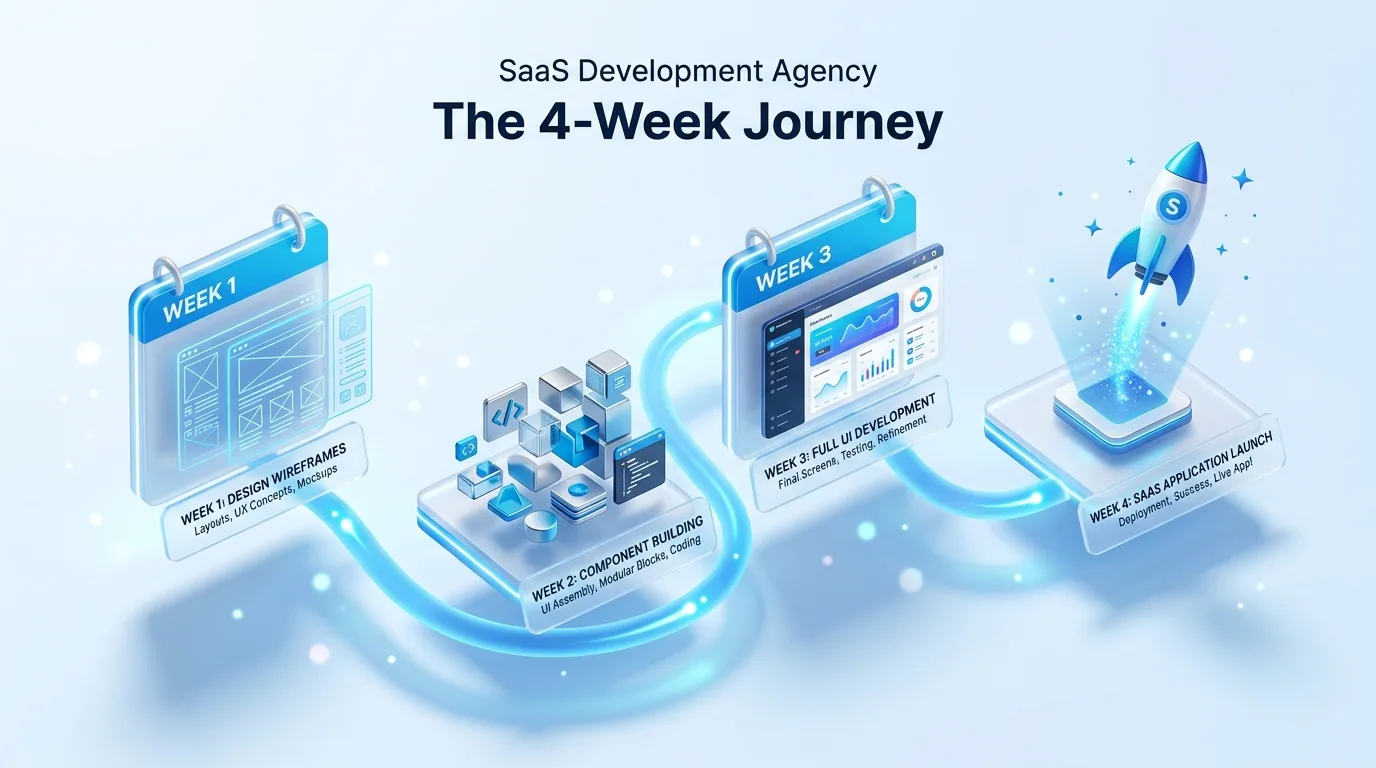
Four Weeks from Figma to Production
Last quarter, a fintech startup came to us with a complete Figma prototype — 14 screens covering onboarding, a transaction dashboard, reporting views, and settings. They had a demo scheduled with a potential enterprise client in five weeks. They needed the prototype to be a working product by then. Not a clickable prototype. A real, deployed application that could process actual data.
We delivered in four weeks. The enterprise demo went well. The client signed. Here is exactly how we did it — the same process we use for every Figma-to-MVP engagement.
Before Week 1: The Pre-Sprint
The engagement officially starts on Monday of week one, but the most valuable work happens in the two to three days before that. We call this the pre-sprint, and it is free for the client.
During the pre-sprint, we conduct a thorough audit of the Figma files. We are looking for specific things: Are all screens designed for at least two breakpoints? Are component states defined — loading, empty, error, disabled? Are the interaction patterns clear — what happens when a user submits a form, what does the success state look like, what does the error state look like? Are the design tokens consistent — are the same colours and spacing values used throughout?
We document every gap we find and present them to the founder before development begins. Gaps in Figma designs are completely normal — designers understandably focus on the happy path. But discovering a missing error state in week three is significantly more expensive than identifying it in the pre-sprint and designing it in parallel with development.
The pre-sprint also produces our technical architecture plan. We decide on the state management approach, the API integration strategy, the authentication provider, and the deployment target. For the fintech client, we chose Next.js with App Router, Supabase for authentication and database, TanStack Query for server state management, and Vercel for deployment.
Week 1: Foundation and Primitives
Monday starts with a 90-minute kickoff with the founder. We walk through every screen together, discussing user flows and business logic that the Figma designs imply but do not explicitly document. What validation rules apply to the onboarding form? What permissions determine which dashboard sections a user sees? What data refresh intervals does the transaction view require?
The rest of week one is pure foundation work. We extract every design token from the Figma file — colours, typography scales, spacing units, border radii, shadows — and implement them as CSS custom properties in a theme file. Every component we build from this point forward references these tokens, never hardcoded values.
We then build the primitive component library: buttons in all variants, text inputs with validation states, select dropdowns, checkboxes, radio groups, modals, toast notifications, and layout primitives. These primitives are built once, tested, and reused across every screen for the rest of the build. By Friday of week one, we typically have 15 to 20 primitive components deployed to the staging environment, plus the authentication flow working end-to-end.
Week 2: Core Product Screens
This is where the product takes shape. We build the screens that represent the core value proposition — the features that, if they work, make the product worth using.
For the fintech client, week two produced the transaction dashboard (data table with sorting, filtering, and search), the transaction detail view (with status timeline and document attachments), and the reporting view (with three chart types pulling from the Supabase database). Each screen was built by composing the primitives from week one with screen-specific components, connected to real API endpoints.
The founder received a daily Loom recording showing the day's progress on the staging environment. On Wednesday, we did a live demo over a video call. The founder identified two changes to the table layout and one additional filter that users would need. Both were implemented by Thursday. This rapid feedback loop is why we communicate directly with founders — no telephone game through project managers.
Week 3: Secondary Flows and Integration
With the core product screens complete, week three focuses on everything that makes the product feel finished. Onboarding flow with progress indicators. Settings screens with form validation and save confirmation. Empty states for every screen — what does the dashboard look like for a brand new user with no data? Error states — what happens when the API is unreachable? Loading states — skeleton screens that match the final layout so there is no layout shift when data arrives.
This is also the week for integration work. Email notifications via Resend. File upload handling for document attachments. CSV export for reporting data. Webhook configuration for the enterprise client's systems. Each integration follows a consistent pattern: service abstraction, error handling, and user-facing feedback.
By the end of week three, the product is feature-complete. Every screen from the Figma file is implemented, responsive, and connected to real data. A non-technical person can use the staging environment and complete every user flow without encountering dead ends.
Week 4: Quality, Performance, and Launch
Week four is entirely dedicated to quality assurance and launch preparation. No new features are added. The goal is to find and fix every issue before users encounter them.
We test every user flow on Chrome, Safari, Firefox, and Edge. We test on iOS Safari and Android Chrome. We test on a 13-inch laptop, a 27-inch monitor, and a phone in portrait and landscape orientation. We run Lighthouse audits and address any Core Web Vitals issues — image optimisation, code splitting, font loading strategy. We run an accessibility audit with axe-core and fix any violations.
We set up error monitoring with Sentry so that production errors are captured with full context. We configure analytics to track key user flows. We verify that the CI/CD pipeline works correctly — pushing to the main branch triggers an automated deployment to production with zero downtime.
On Thursday of week four, we deploy to production with the real domain configured. On Friday, we do a final walkthrough with the founder, hand over all credentials and documentation, and confirm that the product is ready for its first users.
What Made This Possible
Four weeks is fast. It is possible because of three things that most agencies lack: a component-first methodology that eliminates redundant work, direct communication with decision-makers that eliminates feedback delays, and a team that has done this specific type of work dozens of times before. We are not figuring out how to convert Figma to production React on your project — we have refined the process over years and across dozens of SaaS MVPs.
If you have a Figma prototype and a launch deadline, book a free consultation. We will review your designs, give you an honest timeline, and tell you exactly what is achievable within your constraints.
 Custom SaaS Development
 Web App Development
 API Development